 System Requirements
- 500 MHz or higher CPU(Intel P4 is strongly recommended).
- DVD writer drives.
- 4.3 GB or more free disk space.
Here are some tips to successfully clone your DVDs:
- Ensure the DVD you wish to copy is clean (no finger prints) and
not scratched.
- Use high quality recordable DVD disc like Verbatim, CMC, Ritek,
Sony, Fuji, etc. Avoid using cheap discs. Always refer to the DVD
writer manufacturer for the list of recommended discs for your DVD
writer drive.
- Ensure you have sufficient hard-disk space (at least 4.3 GB).
- See Faqs.
1.Install Apollo DVD Copy, just run the setup file and
follow the instructions.
2.Run Apollo DVD Copy...
3.Select a DVD Image source,"Device" means
from a DVD ROM or "DVD-Video Folder" in your harddisc.
If you select "Device",please select the DVD
ROM with source DVD movie disc insert.

If you select "DVD-Video Folder",please select
the folder contains DVD image in your hard disk.

4.Select copy mode:"Copy main movie" or "Split
into 2 D5" or " Copy full disc",
"Copy main movie" will copy only main movie,without
DVD menu and special features to one disc.
"Split into 2 D5" will split a D9 disc into
2 D5 disc,copy full disc with movie,DVD menu,special features,all subtiles
and languages.
"Copy full disc" will compress a D9 disc into
1 D5 disc,copy all movies,DVD menu,special features,selected subtiles
and languages.
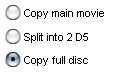
5.If you select "Copy main movie" or "Copy
full disc", you can hit button  to select any audios and subtitles you wanted,the default option will
select all of the audios and subtitles.
to select any audios and subtitles you wanted,the default option will
select all of the audios and subtitles.
6.Select destination type,"Recorder" or "DVD-Video
Folder".
If you select "Recorder",please select a DVD
writer with a blank disc insert,

and then select a folder to save temporary files.Please
make sure you have enough free disc space to store temporary files.A
D5 disc needs 5G and D9 disc needs 9G free space.

If you select "DVD-Video Folder",please select
a folder to save dvd movie files.these files(DVD image) can be used
for playing or burning later.

7.Now all are setted properly, just click on "Start"
button to start processing.DVD copy is a long time job,it will take
you 20-40 minutes, depending on your system speed.We strongly recommend
you use intel P4 cpu to run Apollo DVD Copy.
8.If you have any questions ,please see the help file firstly(comes
with the installation package) or contact
us.
Good Luck! ;-) |




 Copyright
©-2004 Apollo Multimedia. All Rights Reserved
Copyright
©-2004 Apollo Multimedia. All Rights Reserved