
 View
screenshot
View
screenshot


Convert and join AVI
or MPEG files to VCD/DVD/SVCD compliant mpeg file that
can be played on VCD or DVD players. |
|



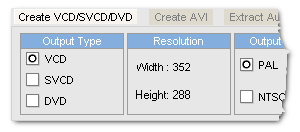
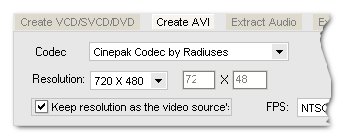
Ace video workshop is a easy to use tool for encoding avi files to VCD/DVD/SVCD compliant mpeg files and vise versa.With ace video workshop you can join and convert several avi files or mpeg files to a large VCD/DVD/SVCD compliant mpeg file for burning to VCD/SVCD/DVD that can be played on VCD players, and many DVD players.You can join and convert several avi files or mpeg files to a large avi file with any codec installed on your system like the popular divx format. Other stunning features including:change format of mpeg files (PAL<==>NTSC), Extract audio from video files to wav and ogg files. Extract images from video files to jpg, bmp, tga, png, tif, pcx format image files. 10 output video effects like flip rotate soften sharpen..., skinable UI with 3 built-In skins and much more.
| Latest Version: | |
| Fullsize: | 2.0 Mb |
| Language: | English |
| Platform: | Windows 95/ 98/ Me / XP / 2000 / 2003 Server or better |
| License Type: | Free to try, $25 to buy. |
| Trial Limitation: | 50% conversion limit. |
| Free Support: | Tech support and feedback : support@dvdtox.com |
Features
 |
|
|
 |
You can also export audio from avi or mpeg files, currently only wav and ogg formats are supported, if you want to get a mp3 format audio file you may extract audio from audio source to wav format firstly then use #1 mp3 to wav converter to convert wav format to mp3 format.
On the 'Extract
image' tag you are able to capture image files from any video
sources, output image format. BMP, JPG, TGA, PNG, TIF, PCX
are supported.

